A user's checklist is a list of actions that need to be completed by that user, or another user with the same responsibility. Every user's checklist is unique to that user. HBS prompts each user to take action on daily directives that need their immediate attention.
The checklist is automatically generated based on three main factors:
- A user's current responsibilities
- Previous actions taken on the project
- Company preferences/settings (material lead times)
A User's Current Responsibilities
Responsibilities are assigned to user roles. When a user is assigned to a user role, that user is granted the permissions and takes on the responsibilities of that role. For example, if a user is assigned to the superintendent role and that role has been assigned the Verify Work Complete responsibility, then when it is time to verify a work order, that task will be listed in that user's checklist.
Previous Actions Taken on the Project
Another factor of whether a prompt is displayed on a user's checklist is what phase that work order is in the 6 phases of the checklist process: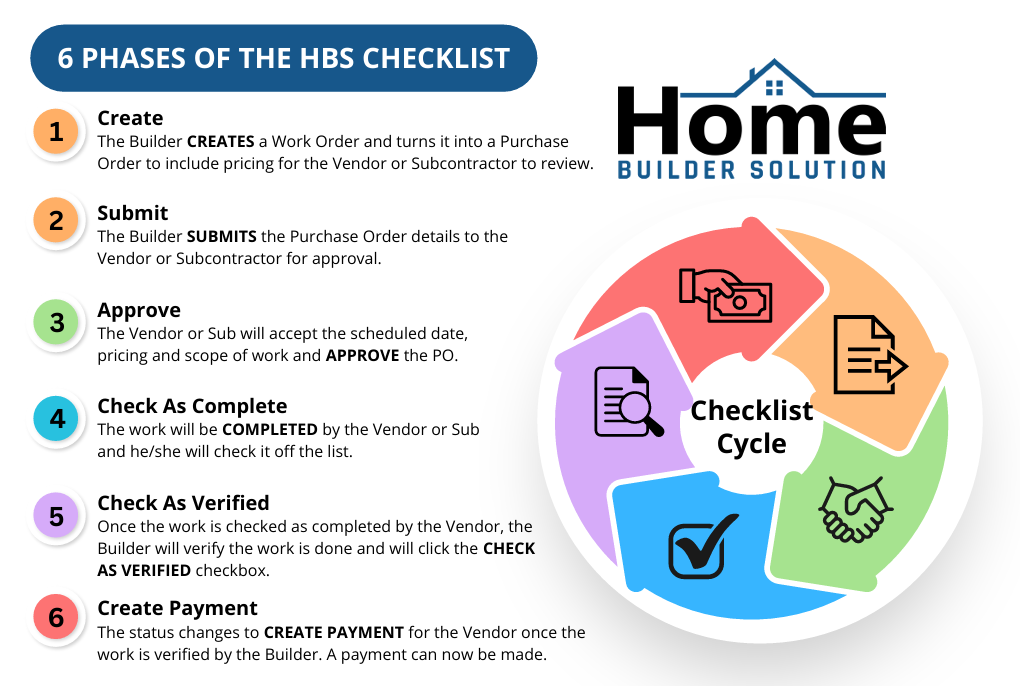
Company Lead Time Preferences
The final factor HBS considers when building a user's checklist are the material and labor lead times that are set in your company preferences. There is a company setting in preferences called PO Approval Days, which is the number of days before the start of a project that you want to start showing checklist items. For example, if your PO Approval Days (material or labor lead time) for windows is set to 30 days then checklist items pertaining to windows will not begin to display until 30 days prior to the start of that work order.
Was this article helpful?
That’s Great!
Thank you for your feedback
Sorry! We couldn't be helpful
Thank you for your feedback
Feedback sent
We appreciate your effort and will try to fix the article